Normalizers
A normalizer renames and reshapes fields as logs are ingested, so data from different sources shares one set of field names. It can also derive fields such as bifract_category and say where to read the event timestamp. Normalizers are assigned to ingest tokens.
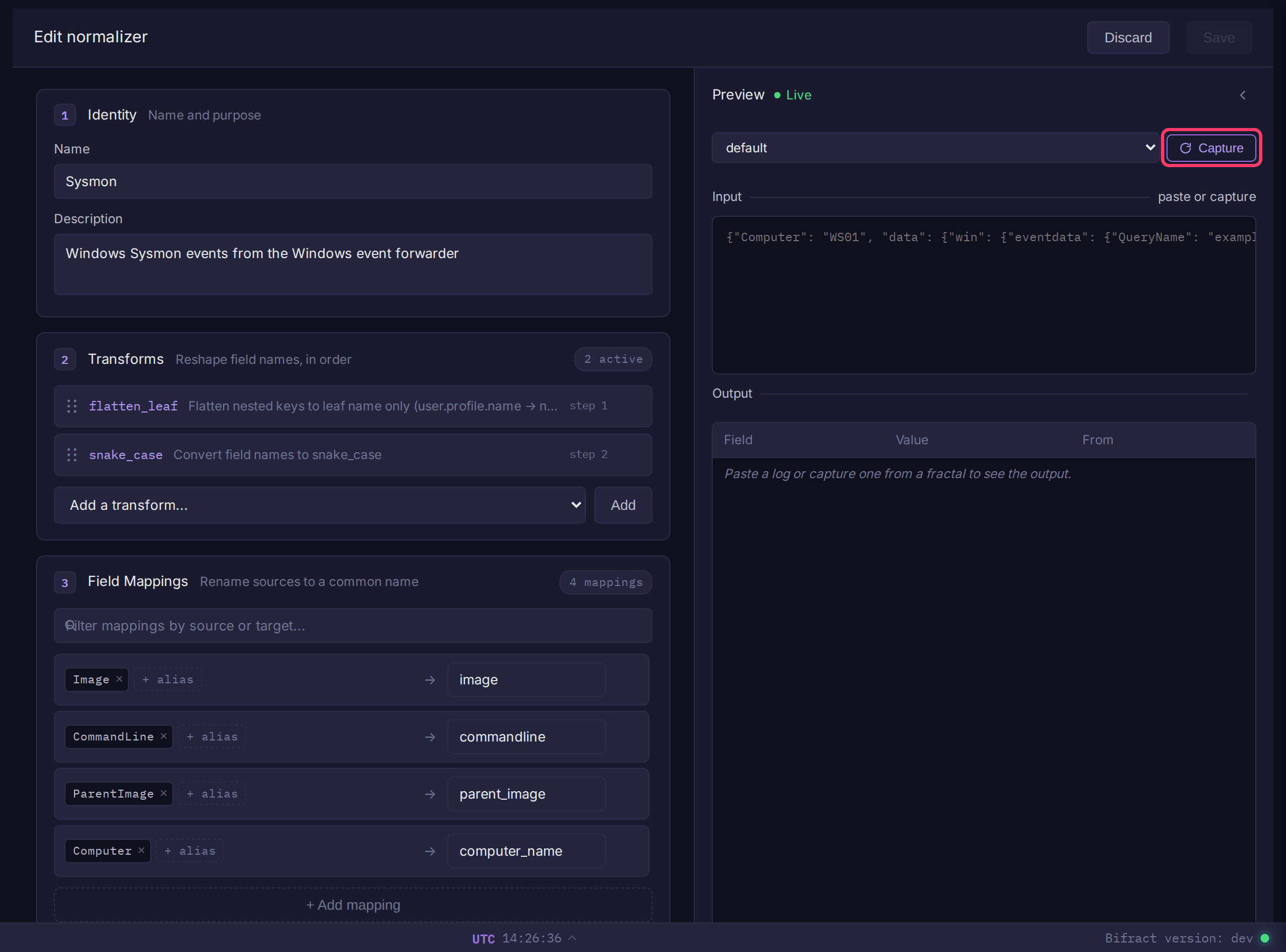
Create a normalizer
Tenant admins only.
- Open Normalizers in the sidebar's admin section.
- Click Create normalizer.
- Enter a Name and optional Description.
- Under Transforms, pick a transform from Add a transform... and click Add. Repeat; drag to reorder.
- Under Field Mappings, click + Add mapping and map one or more source names to a target.
- Under Derived Fields, click + Add derived field to map a field's values to a new field (for example
event_id1 tobifract_categoryprocess_creation). - Under Timestamp Fields, click + Add timestamp field and give a field name and Go time format.
- Check the Preview panel: paste a sample event, or pick a fractal and click Capture to pull recent logs. The output updates live.
- Click Save.
To use it, pick it as the Normalizer on an ingest token. Each token uses one normalizer. Import YAML, Export, Duplicate and Set Default are on the Normalizers page.
Transforms
Transforms rename every field, in order.
| Transform | Example | Cannot combine with |
|---|---|---|
flatten_leaf |
user.profile.name → name |
flatten_full, dedot |
flatten_full |
user.profile.name → user_profile_name |
flatten_leaf, dedot |
dedot |
user.profile.name → user_profile_name |
flatten_leaf, flatten_full |
snake_case |
UserID → user_id |
camelCase, PascalCase |
camelCase |
user_id → userId |
snake_case, PascalCase |
PascalCase |
user_id → UserId |
snake_case, camelCase |
lowercase |
EventID → eventid |
uppercase |
uppercase |
event_id → EVENT_ID |
lowercase |
Field mappings
Map several source names to one target:
| Sources | Target |
|---|---|
userId, user_id, uid |
user_id |
srcIP, src_ip, source_address |
src_ip |
If one event has several fields that map to the same target, the one already named the target wins, otherwise the earliest source counting from the top. The preview flags these collisions.
Map by raw path
A source starting with $. names a path in the raw event rather than a field name after transforms. Use it when two nested fields would otherwise get the same name, such as Velociraptor's System.Execution.ProcessID and EventData.ProcessId:
Raw path rules
| Rule | Detail |
|---|---|
| Matching | Segments split on . and match raw JSON keys case-sensitively. A number selects an element of an array of up to 16 objects ($.args.0.name). Keys containing a dot cannot be addressed. |
| Naming | Stored under the target exactly as written; transforms and other mappings do not rename it. |
| Precedence | The path value always wins its target. Under flatten_leaf a clashing field keeps its full path (event_data_process_id); under flatten_full it is numbered (execution_process_id_2); a name-based mapping to the same target is dropped. Between two matching path sources, the first listed wins. |
| Transforms | A nested path needs flatten_leaf or flatten_full before any rename transform. Without a flatten, only top-level keys ($.EventID) match. |
| Sigma | Sigma rules use field names, so path sources never apply to them. |
Event categories
bifract_category routes events into the provenance graph and scopes Sigma rules, so a normalizer for endpoint data should set it. Add it as a derived field (value_mappings in YAML):
value_mappings:
  - from_field: event_id
    to_field: bifract_category
    map:
      "1": process_creation
      "3": network_connect
      "8": remote_thread
      "10": process_access
      "11": file_write
      "22": dns_query
Derived fields run after field mappings, so from_field must be the target name, not the original source name. An optional default sets the value when nothing in map matches.
Use Sigma's logsource.category names. The exception is registry: emit registry_event for all registry activity, and Bifract maps Sigma's four registry categories onto it. Unlisted categories are used as written.
| Category | Sysmon event | Builds graph edges |
|---|---|---|
process_creation |
1 | yes |
network_connect |
3 | yes |
file_write |
11 | yes |
dns_query |
22 | yes |
remote_thread |
8 | yes |
process_access |
10 | yes |
registry_event |
12, 13, 14 | no |
image_load |
7 | no |
ps_script |
PowerShell/Operational 4104 | no |
pipe_created |
17, 18 | no |
driver_load |
6 | no |
create_stream_hash |
15 | no |
file_delete |
23, 26 | no |
Timestamp fields
Formats use Go layout syntax (2006-01-02T15:04:05Z07:00 for RFC 3339), or unix, unixmilli, unixmicro or unixnano for epoch values. Bifract uses the first level that has timestamp fields configured:
- The ingest token's timestamp fields.
- Otherwise the normalizer's.
- Otherwise the global timestamp settings.
- Then common names (
timestamp,@timestamp,time,ts,_time). If none match, ingest time is used.
Default normalizer
The normalizer marked Default (set with Set Default) is applied to Bifract's internal logs. It cannot be deleted.
Alert feeds can also reference a normalizer, which renames fields in the imported rules to match your data.