MITRE ATT&CK Coverage
The Coverage tab maps your alerts' ATT&CK tags onto the ATT&CK Enterprise matrix, so you can see which techniques you detect, which rules are switched off, and which gaps a feed could close. It is scoped to the current fractal or prism.
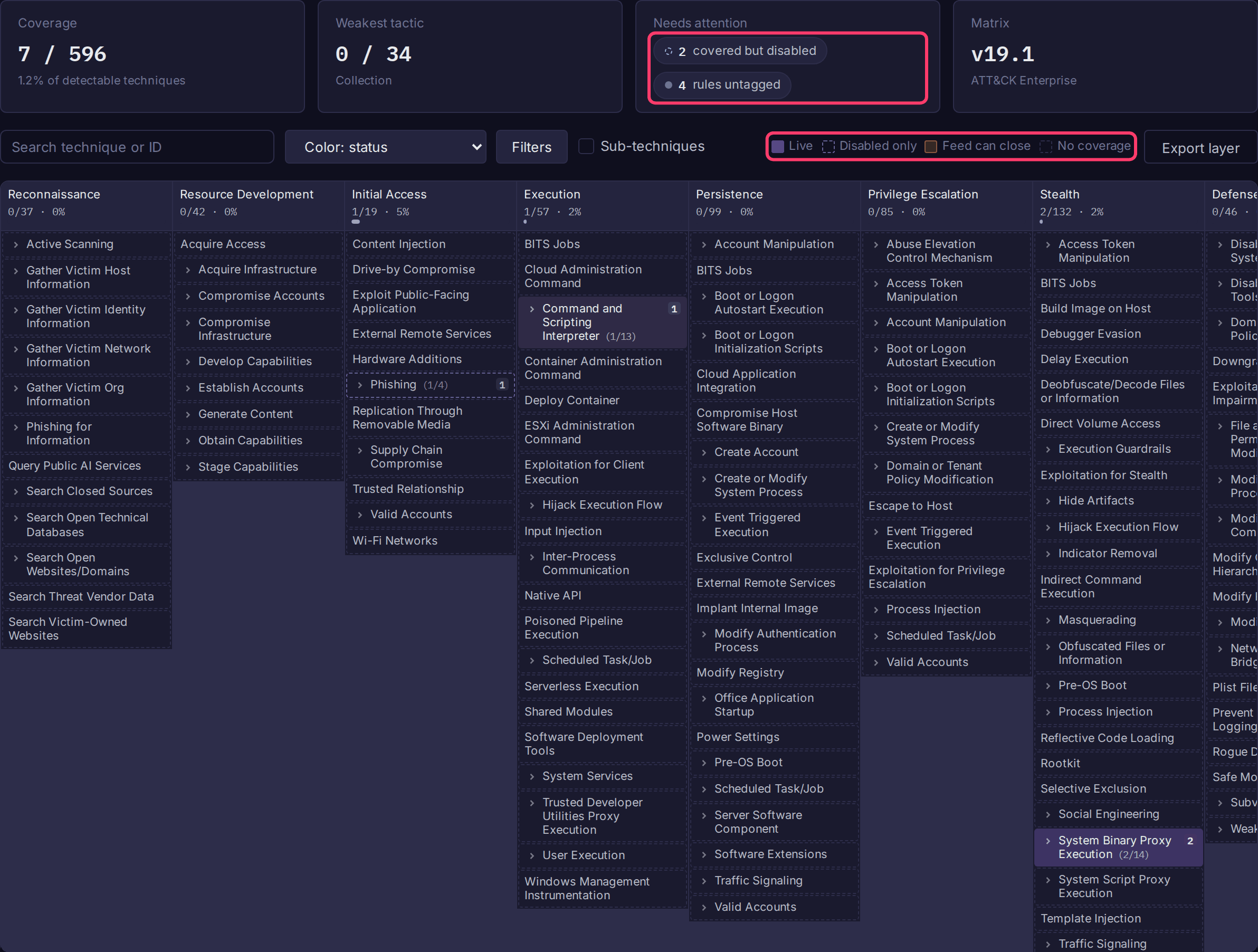
Open the map
- Open a fractal or prism and select Alerts in the sidebar.
- Open the Coverage tab.
- Click any technique to open its drawer: tactics, Covering rules (click one to open it in the editor), platforms, Expected telemetry, and a link to attack.mitre.org.
Coverage comes from alert labels in Sigma tag form, which Sigma rules from Alert Feeds already carry:
Read the map
Each column is a tactic in kill-chain order; each cell is a technique. With Color: status (the default):
| Legend | Meaning |
|---|---|
| Live | At least one enabled rule maps here. The badge shows the count. |
| Disabled only | Every rule mapped here is switched off. |
| Feed can close | No rule here, but a synced feed has rules for it that were not imported. |
| No coverage | No rule, and nothing waiting in a feed. |
Switch to Color: rule count or Color: highest severity when tuning depth rather than looking for holes.
The summary row shows:
| Tile | Shows |
|---|---|
| Coverage | Detectable units covered (see How coverage is counted). |
| Weakest tactic | The tactic with the lowest share covered. |
| Needs attention | Chips for gaps your feeds can close, techniques covered but disabled, untagged rules and broken tags. Click the first two to filter the map to those cells. |
| Matrix | The embedded ATT&CK version. |
Each column header shows a meter: the solid part is covered, the amber part is what a feed could close.
Close a gap
- Click an amber (Feed can close) cell, or the gaps your feeds can close chip.
-
The drawer lists the feed rules under Available in your feeds, each with the reason it is not running:
Reason Fix below the feed severity thresholdLower the feed's Minimum severity. below the feed maturity thresholdLower the feed's Minimum status. cannot be parsedThe rule YAML is invalid. cannot be translated to BQLBifract cannot express the rule's logic (see supported modifiers). failed to importThe translated query was rejected by Bifract's parser. -
To write a new rule instead, click Write a detection in the drawer. The alert editor opens with the name, the
attack.tNNNNlabel and MITRE's expected telemetry filled in.
Note
Skipped rules are recorded on each feed sync. After an upgrade, gaps appear only once feeds sync again; click Sync Now on the feed under Alerts > Feeds > Manage feeds to populate them immediately.
Controls
| Control | Effect |
|---|---|
| Search technique or ID | Dims non-matching cells and expands sub-technique groups that hold a match. |
| Color | Status, rule count or highest severity. |
| Filters | Show (all, gaps only, covered only), Severity, Platform, Source (all rules, manual only, or one feed) and Enabled rules only. The platform filter also narrows the total, so the percentage stays honest. |
| Sub-techniques | Expands every sub-technique group. Cells with a chevron expand individually. |
| Export layer | Downloads an ATT&CK Navigator layer (see below). |
Export a Navigator layer
Export layer downloads the current view, with active filters applied, as an ATT&CK Navigator layer. Scores are rule counts; each comment records the direct and inherited split. Use it to share coverage with people who have no Bifract access, to diff against another layer (an EDR vendor's claims, a red team, a threat group), or to keep dated snapshots.
How coverage is counted
| Number | Counts |
|---|---|
| Coverage | Detectable units: every sub-technique, plus every technique without sub-techniques. Nothing is inherited, so a rule tagged attack.t1547 covers none of its sub-techniques. |
| Top-level techniques touched (tooltip on Coverage) | Techniques with a rule on them or on any sub-technique. Often about twice the Coverage percentage, so use it for breadth only. |
Other rules:
- A sub-technique tag (
attack.t1543.003) is direct coverage of the sub-technique and inherited coverage of its parent. The drawer shows both. - A tactic-only tag (
attack.persistence) covers nothing and counts as an untagged rule. - A retired technique ID resolves to its replacement where ATT&CK defines one (
attack.t1086counts toward T1059.001). One with no replacement is counted under broken tags. - Deprecated techniques are excluded from every total.
- Old tactic names still work:
attack.defense-evasionresolves to Stealth (renamed in ATT&CK v19) and the reverse.
Update the ATT&CK matrix
The matrix is embedded in the binary (about 17 KB gzipped), so air-gapped installs work. Regenerate it when MITRE publishes a new version:
go run ./cmd/bifract-attackgen -out pkg/attack/data/enterprise-attack.json.gz
go test ./pkg/attack/...
This downloads MITRE's STIX bundle and writes the slimmed file; pass -in enterprise-attack.json to use a local copy instead. Commit the regenerated file.