Lookups
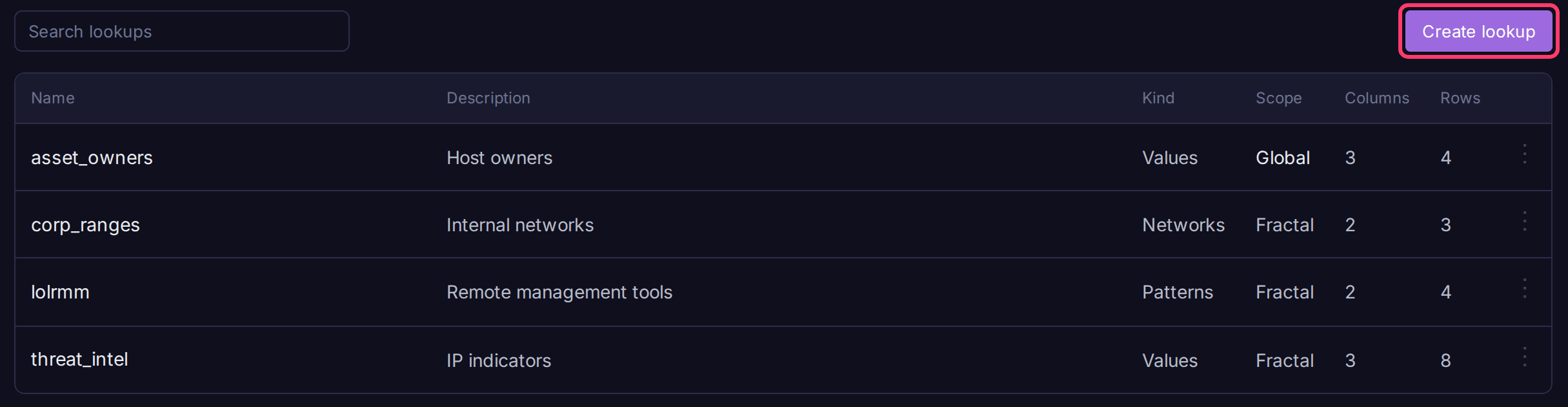
A lookup is a table you join onto query results with match(), for example to tag IPs from a threat feed or map hostnames to owners. Lookups belong to a fractal or prism and live on its Lookups page; BQL refers to one by name as dict=.
Create a lookup
- Open Lookups in the sidebar (under Data).
- Click Create lookup.
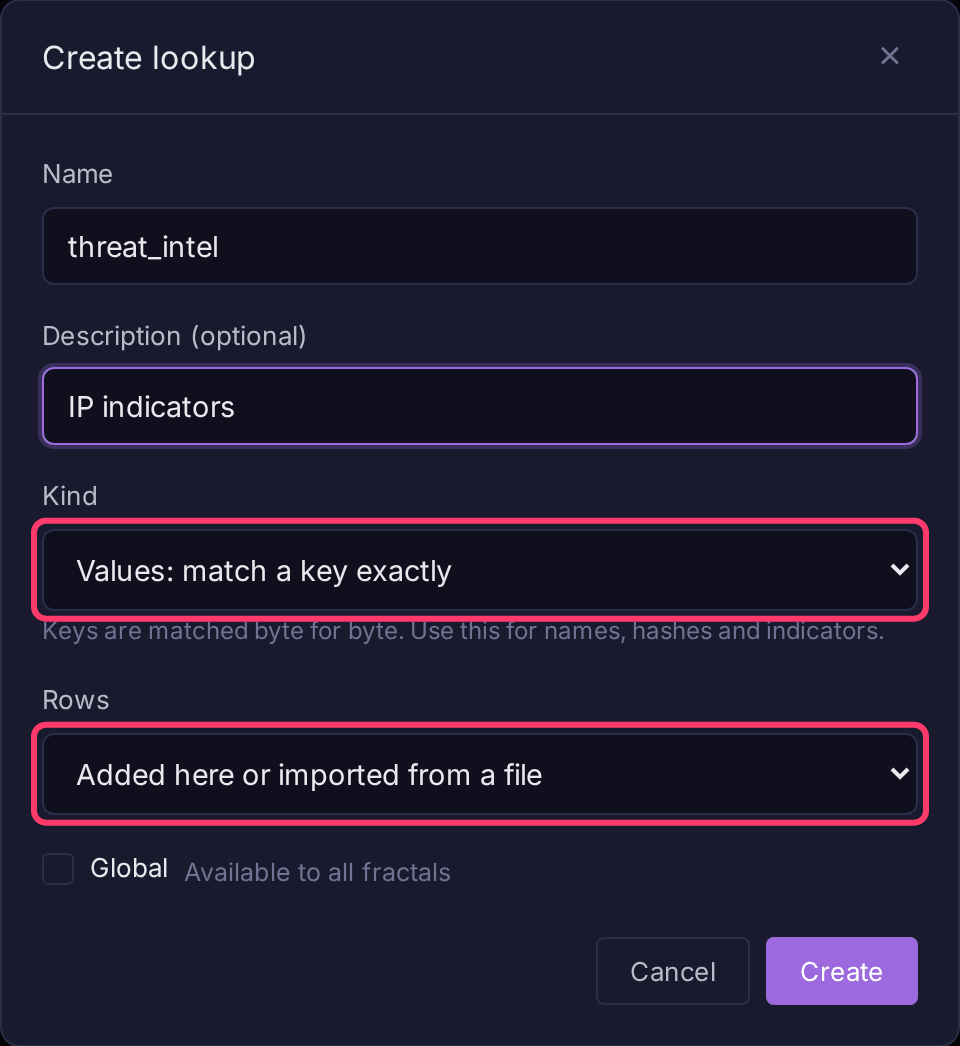
- Enter a Name (letters, digits and underscores) and an optional description.
-
Pick a Kind:
Kind Keys are Use for Values Exact strings Names, hashes, indicators Networks CIDR ranges; an address matches the narrowest range Subnets, sites Patterns Regular expressions; the first match in row order wins Command lines, paths -
Leave Rows as Added here or imported from a file, or pick Fetched from a URL and kept up to date (admins only, see Fill a lookup from a URL).
- Check Available to all fractals to make it global.
- Click Create.
Add data
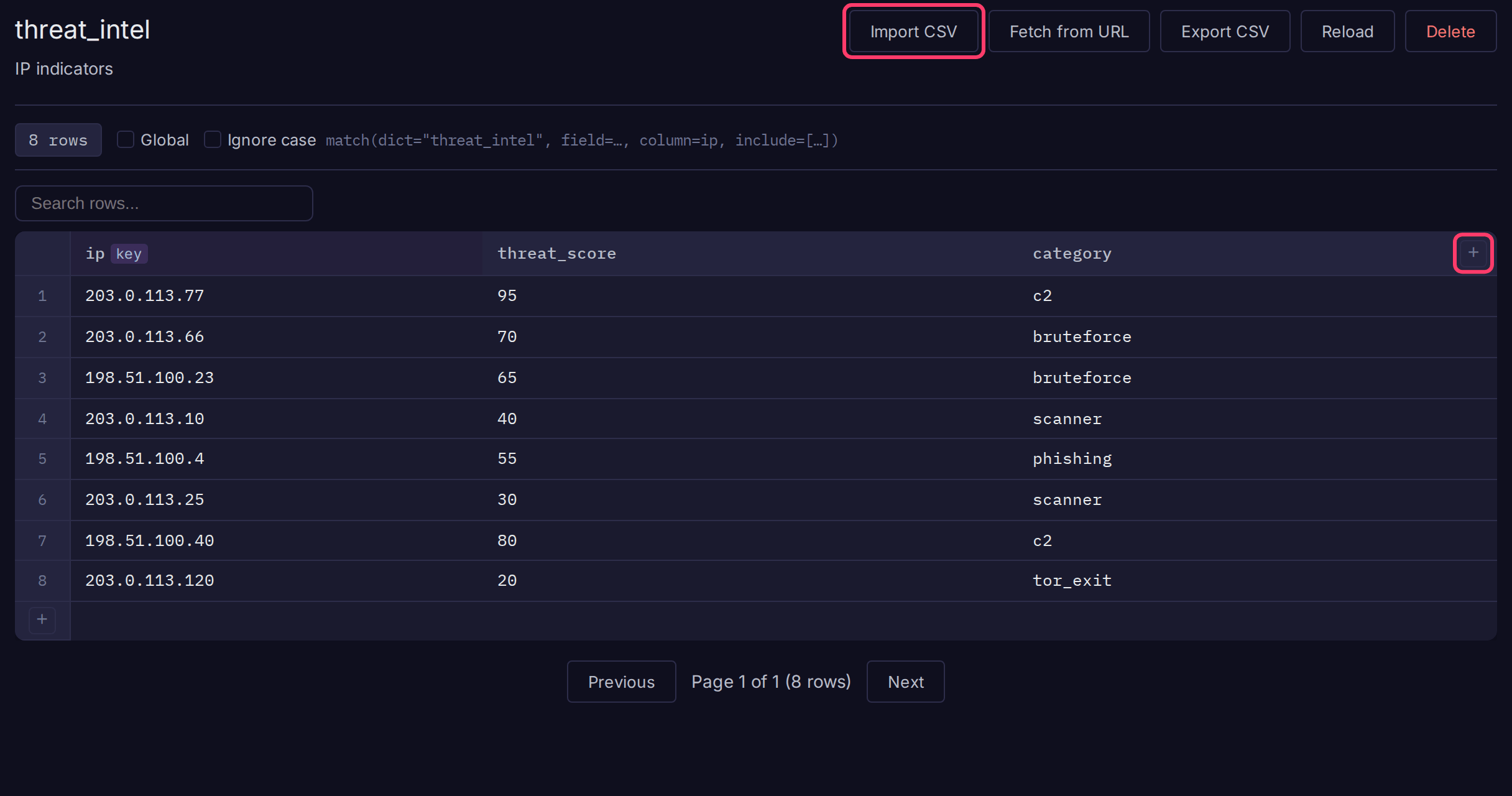
Open the lookup to edit it like a spreadsheet.
- Click + in the header to add a column. The first column you add is the key column.
- Click + in the row-number column to add a row, or click Import CSV to drop in a file. The first CSV row must be headers; new columns are created and rows with an empty key are skipped.
- Double-click a cell to edit it. Enter saves, Escape cancels.
Other controls:
- Click a column's key toggle to make it an extra lookup key.
match(column=...)only accepts key columns. On a Networks or Patterns list, extra keys match exact values. - Ignore case (Values lists only) matches keys whatever their casing.
- Global toggles visibility across all fractals and prisms.
- Reload forces ClickHouse to refresh its copy now. Row edits already do this.
- Export CSV downloads the rows.
On a Patterns list, put specific expressions above general ones: the first match answers.
A Patterns list is screened with one Hyperscan pass over all its expressions, which keeps large lists fast. Hyperscan refuses a few expressions that are otherwise valid, such as (?U) or very large repeats like a{1000}. A list holding one still matches correctly, but its lookups lose the speed-up.
Use a lookup in a query
Add require=true to keep only matching rows. The editor shows a ready-made match() line for each lookup. See Enrichment for every parameter and the per-kind behavior.
Fill a lookup from a URL
A lookup can fetch its rows from a URL on a schedule, so a published list (a threat feed, a tool inventory) stays current. An admin either picks Fetched from a URL and kept up to date when creating it, or clicks Fetch from URL on an existing lookup, then fills in the fields and clicks Save and fetch.
| Field | Meaning |
|---|---|
| URL | An http or https address. The server fetches it |
| Format | Detect, CSV, TSV, JSON array, NDJSON, or one value per line. Gzip is unpacked either way |
| Key column | The file column holding the key. For a one-value-per-line file, the name to give that column |
| Other columns to keep | Comma-separated file columns. Empty keeps all |
| Split key cells on | Splits one key cell into a row per value, each with the record's other columns |
| Keys are globs | Patterns lists only: converts * and ? wildcards to expressions. See Glob keys |
| Refresh every | 15 minutes, hour, 6 hours, day or week (API: 5 minutes to 7 days). Default one hour |
Each refresh replaces every row with the file's contents, in file order. An unchanged file is skipped.
- If a fetch fails, returns no usable rows, or names a missing column, the existing rows stay and the error shows on the lookup. Retries start after 5 minutes and back off up to the refresh interval.
- Records with an empty or invalid key are skipped and counted.
- URL lookup rows are read-only (no editing, CSV import, or alert dictionary actions). Detach stops refreshing and makes them editable. Edit source changes the settings.
- Analysts can click Refresh now, at most once a minute. Only admins can set, change or detach a source.
Network access
Sources reach only public addresses by default. To allow private and loopback addresses, turn on Settings > Security > Lookup sources on the internal network. Cloud metadata addresses are always refused, and HTTP proxy settings are not used.
Limits: 64 MiB per file (512 MiB unpacked), 2 million rows, or 100,000 for a Patterns lookup.
Glob keys
A glob matches ignoring case. * matches any run of characters and ? any one, across path separators. A glob without \ or / matches the last path segment. A glob of only wildcards is skipped.
| Glob | Matches |
|---|---|
aeroadmin.exe |
C:\Tools\AeroAdmin.exe, aeroadmin.exe |
tigervnc*.exe |
C:\bin\tigervnc-1.12.exe |
C:\Users\*\AppData\Local\RemSupp\* |
anything under any user's RemSupp folder |
Example: flag processes running from a known remote-management tool's path using the LOLRMM list.
The Exchange adds this lookup in one click, or the whole RMM hunting bundle. To set it up by hand:
- Create a Patterns lookup named
lolrmm, fetched fromhttps://raw.githubusercontent.com/magicsword-io/LOLRMM/main/website/public/api/rmm_tools.csv. - Set Key column to
InstallationPaths, Other columns to keep toName,Description, Split key cells on to,, and check Keys are globs. - Query:
* | match(dict="lolrmm", field=image, column=InstallationPaths, include=[Name,Description], require=true)
Access and limits
- Analysts create and edit lookups; viewers can read them.
- All columns are stored as strings.
- Rows with a blank key are ignored, since they would match every log missing the field.