Alert Webhooks
A webhook sends a firing alert to an outside system, such as a chat channel, ticket queue or SOAR playbook. This page covers setup, the fields a webhook takes, and the payload Bifract sends.
Create a webhook
Webhooks are managed by tenant admins.
- Open Alerts in the sidebar, then the Actions tab.
- Click Create action, then the Webhook tile.
- Fill in Name and URL. Optionally set HTTP Method, Timeout (seconds), Retry count, Authentication and Custom headers.
- Under Payload, keep Standard envelope or choose Custom template (see Custom payloads).
- Click Preview payload to render it against sample data, or Send test to deliver it and see the response. Both work before saving.
- Click Save. Then, in an alert's editor, pick the webhook from Add action... in the Actions section.
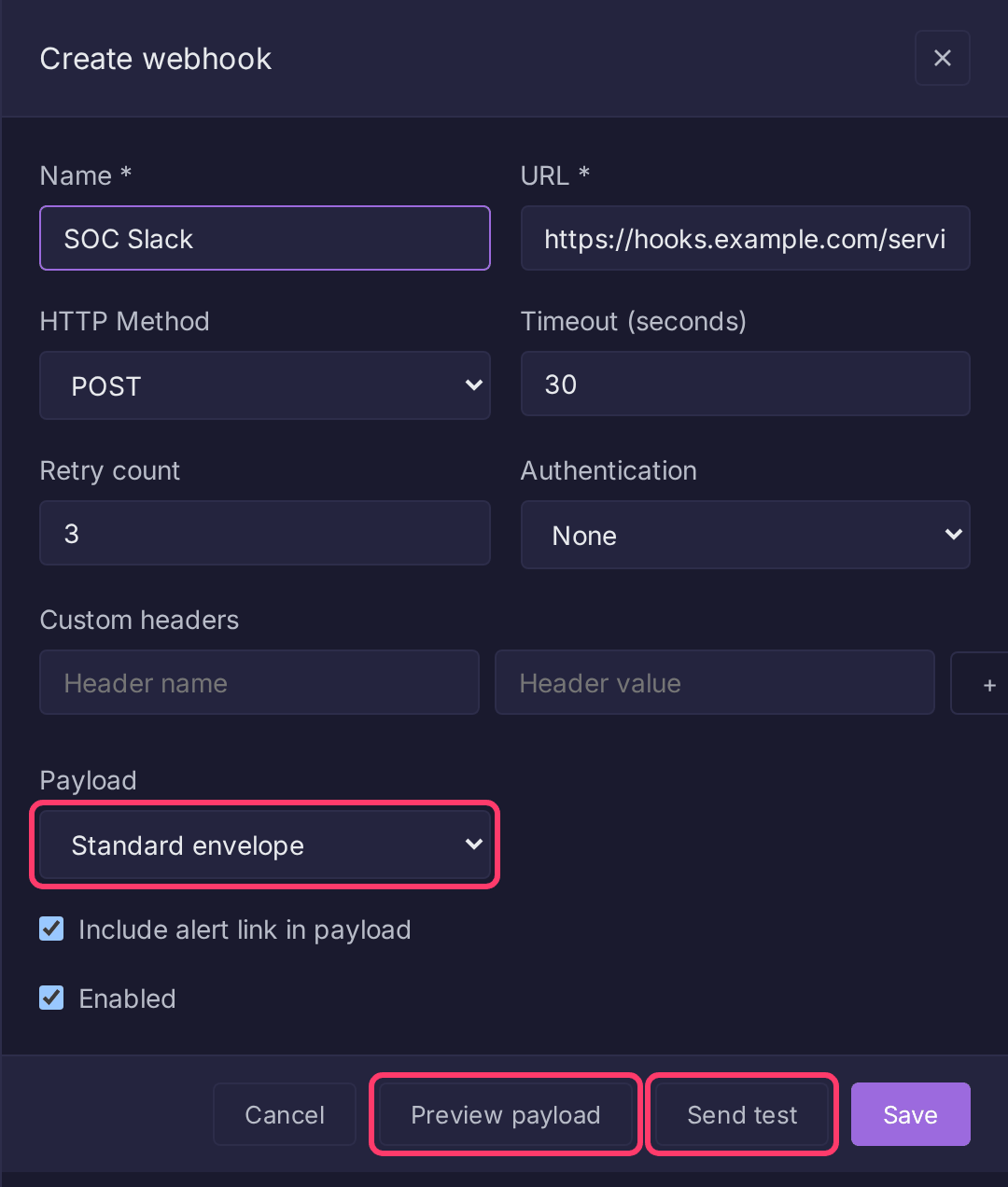
The same operations are in the API under /api/v1/webhooks (All Operations).
Fields
| Field | Type | Description |
|---|---|---|
name |
string | Unique name |
url |
string | Destination, http or https only |
method |
string | POST (default), PUT or PATCH |
headers |
object | Custom HTTP headers |
auth_type |
string | none, bearer or basic |
auth_config |
object | token for bearer; username and password for basic |
timeout_seconds |
int | Request timeout (default 30) |
retry_count |
int | Retries with exponential backoff (1 s, 2 s, 4 s...). The UI defaults to 3; the API stores 0 if omitted |
include_alert_link |
bool | Add alert_link to the payload (default true) |
body_mode |
string | envelope (default) or template |
body_template |
string | Required when body_mode is template |
content_type |
string | Content-Type header (default application/json) |
enabled |
bool | Whether it fires. The UI defaults to on; the API treats an omitted value as false |
Standard envelope
{
  "alert_name": "Security Alert for 10.0.0.5",
  "original_name": "Security Alert for {{src_ip}}",
  "alert_id": "uuid",
  "description": "Detects suspicious login patterns",
  "severity": "high",
  "labels": ["sigma:high", "product:windows"],
  "triggered_at": "2026-03-01T12:34:56Z",
  "query_string": "event_id=4625 | count() > 10",
  "match_count": 15,
  "alert_link": "https://bifract.example.com/...",
  "results": [
    {"src_ip": "10.0.0.5", "user": "admin", "event_id": "4625"}
  ]
}
| Field | Description |
|---|---|
alert_name |
Name with {{field}} templates filled from the first result |
original_name |
Present only when the name had templates |
results |
The matching records |
match_count |
Number of results |
alert_link |
Link to the results in Bifract, when include_alert_link is on. Built from BIFRACT_BASE_URL, else https:// + BIFRACT_DOMAIN |
Custom payloads
Set body_mode to template when the destination wants its own format. The template is Go text/template, rendered once per delivery. The form's Splunk HEC, NDJSON rows and Slack message buttons insert starting templates.
| Data | Description |
|---|---|
.AlertName, .OriginalName, .AlertID, .Description, .Severity |
Same as the envelope |
.Labels, .QueryString, .MatchCount, .AlertLink |
Same as the envelope |
.TriggeredAt |
Trigger time (Go time.Time) |
.Results |
Matching records, each a map of field name to value |
| Function | Description |
|---|---|
toJSON |
Marshal any value to JSON, quoting and escaping strings |
field |
Read one key from a result, for names containing dots |
unixSeconds, unixMillis, rfc3339 |
Format a time |
join, lower, upper, default |
String helpers; subject last so they pipe: {{.Labels \| join ", "}} |
Example: one Splunk HEC event per match, sent to /services/collector/event with an Authorization: Splunk <token> custom header:
{{- range .Results}}
{"time":{{unixSeconds $.TriggeredAt}},"sourcetype":"bifract:alert","event":{{toJSON .}}}
{{- end}}
Warning
Build every value with toJSON instead of quoting it yourself, e.g. {"text":{{toJSON .AlertName}}}. A field containing a quote or newline otherwise breaks the body.
Use field for dotted names, since .host.name reads as a nested lookup: {{field . "host.name"}}.
A template that does not compile is rejected on save. One that fails to render is reported without retrying. Rendered bodies are capped at 8 MB.
Network access
Webhooks reach only public addresses by default. To deliver to a service inside your network, turn on Settings > Security > Webhooks and Git repositories on the internal network. Cloud metadata addresses are always refused, and HTTP proxy settings are not used.
A URL must not carry a username or password; use the Basic auth type instead. Redirects are not followed: a 3xx answer, like a refused address, fails the delivery without retrying.