Alert Feeds
An alert feed syncs detection rules from a Git repository into a fractal or prism. It imports Sigma rules (translated to BQL) and native Bifract alert YAML, and keeps them up to date on a schedule.
Add a feed
Requires the tenant admin role.
- Open a fractal or prism and select Alerts in the sidebar.
- Open the Feeds tab and click Manage feeds.
- Click Add feed.
- Fill in at least Name and Repository URL, plus the fields you need.
- Click Create feed. To sync right away, click the Sync Now icon on the feed's row.
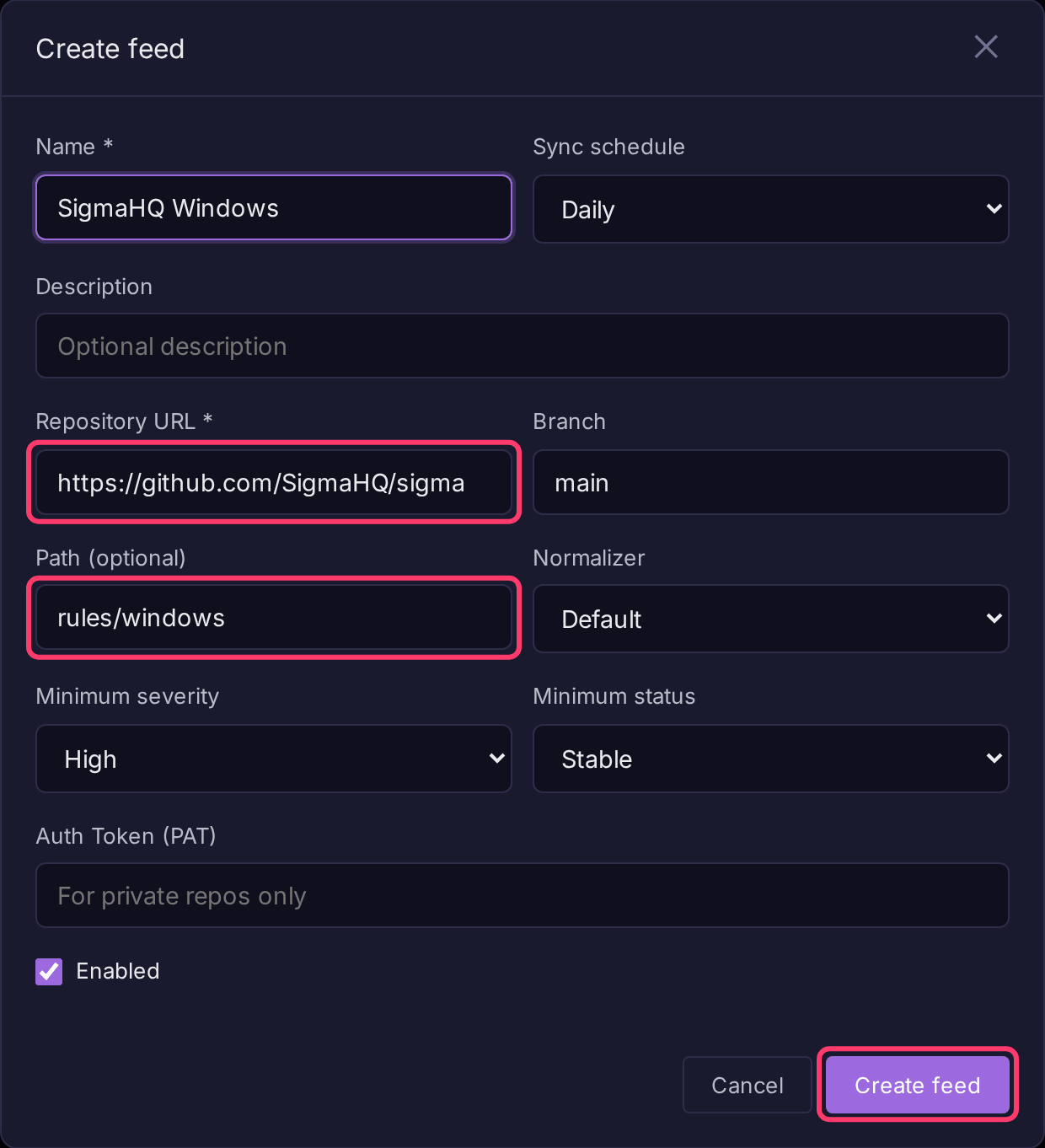
Imported rules appear in the Feeds tab. Click one to Edit, Disable or Export YAML it. Editing a feed rule saves a separate manual alert (Save as Manual Alert); the feed-managed original stays as it is.
Feed fields
| Field | Description |
|---|---|
| Name | Display name. |
| Sync schedule | Never, Hourly, Daily (default), Weekly or Monthly. |
| Repository URL | HTTP or HTTPS Git URL, e.g. https://github.com/SigmaHQ/sigma. Put credentials in Auth Token, not the URL. |
| Branch | Default main. |
| Path (optional) | Subdirectory holding the rules, e.g. rules/windows. Empty means the whole repository. |
| Normalizer | Maps Sigma field names onto your log schema. Default uses the default normalizer. |
| Minimum severity | Skip rules whose Sigma level is lower. Order: informational, low, medium, high, critical. |
| Minimum status | Skip rules whose Sigma status is lower. Order: unsupported, deprecated, experimental, test, stable. |
| Auth Token (PAT) | Personal access token for private repositories. Encrypted at rest. Moving the URL to another host, port or scheme clears it unless a new token is entered. |
| Enabled | Whether the feed syncs. |
What a sync does
- Clones the repository and reads every
.yml/.yamlfile under Path. - Creates alerts for new rules, updates changed ones and deletes rules that were removed.
- Records every rule it skipped and why, which ATT&CK Coverage uses to show gaps a feed could close.
Note
If the path lists no rule files, or none of the files could be used, nothing is deleted and the sync reports an error. A wrong path or branch cannot wipe the feed's alerts.
Repositories are cloned from public addresses only by default. For a Git server inside your network, turn on Settings > Security > Webhooks and Git repositories on the internal network. Cloud metadata addresses are always refused, and HTTP proxy settings are not used.
Recommended community feeds
| Name | Repository URL | Path | Minimum severity | Minimum status |
|---|---|---|---|---|
| SigmaHQ Windows | https://github.com/SigmaHQ/sigma |
rules/windows |
high | stable |
| Hayabusa Sysmon | https://github.com/Yamato-Security/hayabusa-rules |
sigma/sysmon |
medium | stable |
Log source scoping
A Sigma rule's logsource.category becomes a bifract_category filter in front of its detection, so the rule only runs against the event type it was written for:
becomes
Category names pass through unchanged, so your normalizer should emit Sigma's category names. These are aliased:
Sigma logsource.category |
bifract_category |
|---|---|
network_connection |
network_connect |
file_event, file_create |
file_write |
create_remote_thread |
remote_thread |
dns_query_unfiltered |
dns_query |
registry_add, registry_set, registry_delete, registry_rename |
registry_event |
Rules with no logsource.category (for example Windows Security log rules) are not prefiltered; they scope themselves with EventID.
Rules for event types you do not collect will not match
A registry_set rule matches nothing unless your normalizer sets bifract_category=registry_event. If a rule you expect to fire is silent, check that your normalizer emits the category its logsource declares.
How Sigma values match
Bifract follows the Sigma specification:
- Case is ignored unless the field uses
cased.OriginalFileName: Cmd.Exematchescmd.exe. *matches any run of characters,?exactly one, in plain values and incontains,startswithandendswith.- A backslash escapes
*,?or another backslash. Before any other character it is literal, so Windows paths need no escaping. A separator followed by a wildcard must be doubled:C:\Windows\\*matches everything underC:\Windows\, whileC:\Windows\*matches only the literal textC:\Windows*. Field: nullmatches an absent or empty field;'*'matches any non-empty value.
Supported modifiers
| Modifier | Meaning |
|---|---|
contains, startswith, endswith |
Value appears anywhere in, at the start of, or at the end of the field |
all |
Every listed value must match, not just one |
windash |
A - or / starting a word also matches /, -, en dash, em dash and horizontal bar |
re |
Regular expression, case-sensitive |
re\|i, re\|m, re\|s |
Regex flags: case-insensitive, multiline, dot matches newline |
cased |
Match case-sensitively |
cidr |
Field is an IPv4 or IPv6 address in the range; not an address never matches |
exists |
true: field is present and non-empty; false: absent or empty |
gt, gte, lt, lte |
Numeric comparison; a missing or non-numeric field never matches |
fieldref |
Field equals another field's value; both must be present |
base64, base64offset |
Value base64-encoded, matched case-sensitively. base64offset needs contains and matches the value at any byte offset |
wide, utf16le, utf16be, utf16 |
Encode the value as UTF-16 before base64 or base64offset |
A rule using any other modifier (expand), fieldref with contains, startswith or endswith, an aggregation condition (| count() by ...) or a modifier combination such as contains|endswith is not imported. It shows in ATT&CK Coverage as cannot be translated to BQL.